AI Writing Assistant Productivity Quiz Ad Template - Square
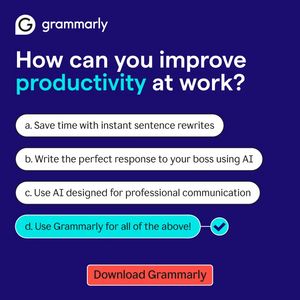
This square ad template promotes an AI writing assistant for workplace productivity, using a quiz-style prompt to pull the viewer into a quick mental “choose the best option” flow. The design features...
Free for 7 days — Cancel anytime
About This Template
This square ad template promotes an AI writing assistant for workplace productivity, using a quiz-style prompt to pull the viewer into a quick mental “choose the best option” flow. The design features a deep indigo background with bold white typography and a bright teal highlight on the word “productivity,” creating instant hierarchy. Four rounded, pill-shaped answer bars mimic a multiple-choice UI, with the final option emphasized in teal and a checkmark icon to signal the “correct” choice. A contrasting red CTA button at the bottom (“Download…”) anchors the next step. Strategically, this creative works well in mid-funnel consideration for solution-aware audiences: it reframes common pain points (rewriting, replying to a boss, professional tone) into concrete outcomes, then bundles them into one tool. The professionalism trigger is reinforced through clean spacing and interface-like elements, while efficiency is communicated via “save time” language. Brands can easily swap the headline question, answers, accent color, and CTA to match different AI tools or productivity apps while preserving the quiz pattern that drives engagement.